CRM for restaurants, cafes, delivery and beauty salons
Built-in CRM right inside the Skyservice POS register: a customer database with purchase history, segmentation, a loyalty program, campaigns via SMS, Viber and email, and automatic reminders — all in one system, with no separate service.
What CRM in Skyservice POS is
CRM is a customer management system inside your register. Every buyer gets a customer card: contacts, a discount card, balance, accumulated bonuses and the full history of purchases and visits. Unlike a standalone CRM service, in Skyservice POS the CRM works together with the register, products and receipts — every payment automatically lands in the customer's profile. You don't have to reconcile data across different programs: sales, the customer database and loyalty all live in one place.
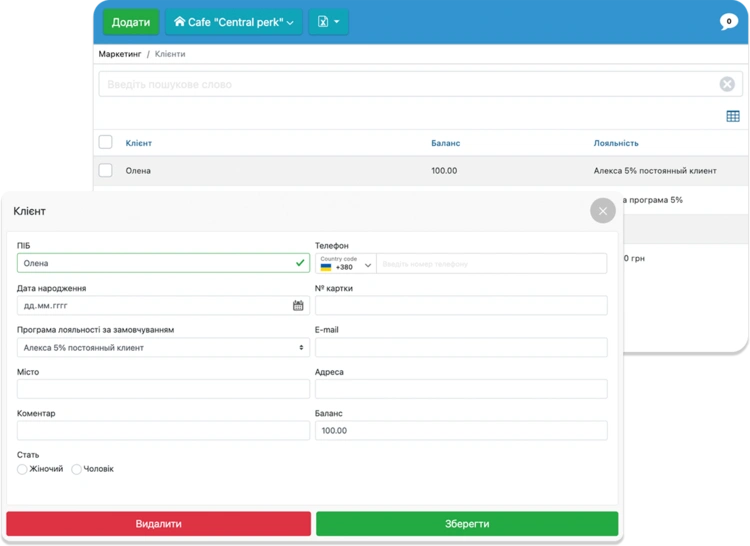
How Skyservice CRM works
A customer receives a discount or bonus card — from then on, every purchase or visit is recorded in their profile: what they bought, how much they spent, how often they come and how many bonuses they've accumulated. You create the database manually or import an existing one, after which it grows on its own with every receipt.Based on this history you split customers into segments — regulars, VIPs, those who haven't visited in a while — launch a loyalty program with bonuses and discounts, send campaigns via SMS, Viber or email, and turn on automatic triggers: visit reminders, birthday greetings, win-back of dormant customers. This turns working with customers from guesswork into decisions based on real data.
Scenario: a returning customer and a personalized offer
A guest dined at your restaurant a month ago and hasn't come back. The CRM shows them in the "haven't visited in a while" segment. You send them a personalized offer via Viber — a discount on a dish they already ordered. The customer returns, and the system awards bonuses and records the visit. It works the same way for a beauty salon (a reminder that it's time for a treatment), for delivery (reactivating a customer who hasn't ordered in a while) or for a bakery (a birthday bonus). Instead of guessing — precise actions based on each customer's history.
CRM for different business areas
The CRM core is the same, but each area has its own focus. Here's how Skyservice POS works with customers in popular niches:
CRM for restaurants and cafes
Keep a database of guests with their order history: what they ordered, how often they come, how much they spend. Award bonuses, make personalized offers and bring visitors back with campaigns via SMS or Viber. CRM for restaurants and cafes turns one-time guests into regulars.
CRM for delivery
Store your delivery service customers with their addresses and preferences. CRM for delivery helps bring back those who haven't ordered in a while through personalized discounts and campaigns, while bonuses motivate them to order from you rather than from an aggregator.
CRM for beauty salons
A customer card with a history of visits and services, automatic reminders about the next treatment, a loyalty program and gift certificates. CRM for beauty salons keeps customers on schedule and brings them back for repeat visits.
CRM for bakeries and confectioneries
Discount and bonus cards, promotions on baked goods, a birthday bonus. CRM for bakeries encourages regular customers to return and buy more — and you can see who your best customers are.
CRM for stores and retail
A single buyer database, accumulative discounts, segments by purchase amount, and campaigns about promotions and new arrivals. CRM for stores raises the average check and the frequency of returns.
How to launch CRM in Skyservice POS in 3 steps
- 1
Set up your customer database
Create customer cards manually or import an existing database. Issue discount or bonus cards — every payment will start landing in the customer's profile automatically.
- 2
Configure loyalty and segments
Turn on bonus accrual, discounts and promotions, and split customers into segments by purchase amount, frequency or category — so that offers are personalized.
- 3
Launch campaigns and triggers
Send campaigns via SMS, Viber or email and turn on automatic reminders — about a visit, a birthday or bringing back a customer who hasn't come in a while.
A notebook or Excel vs. CRM in Skyservice POS
| What we compare | A notebook or Excel | CRM in Skyservice POS |
|---|---|---|
| Customer database | Scattered records that are easy to lose | A single database with a card for every customer |
| Purchase history | You have to remember and write it down by hand | Automatically from every receipt |
| Segmentation | Practically impossible | Groups by amount, frequency and category |
| Loyalty and bonuses | You count by hand, easy to make mistakes | Bonuses and discounts are awarded automatically |
| Customer campaigns | None, or a separate paid service | SMS, Viber and email straight from the system |
| Reminders and triggers | You keep them in your head | Automatically: visit, birthday, reactivation |
What Skyservice CRM can do
All customer work — in one system together with the register and inventory:
Customer database and card
A single database with a profile for every customer: contacts, discount card, balance and accumulated bonuses.
Purchase and visit history
What a customer bought, from whom, how much they spent and how often — recorded automatically from every receipt.
Customer segmentation
Splitting the database into groups by purchase amount, frequency or category for personalized offers.
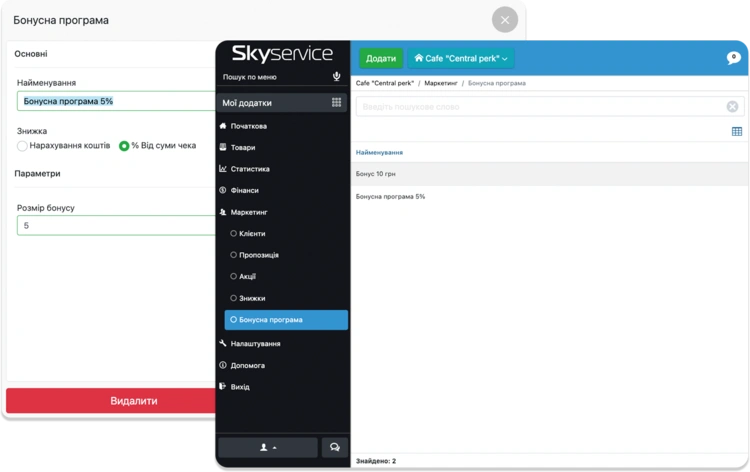
Loyalty program
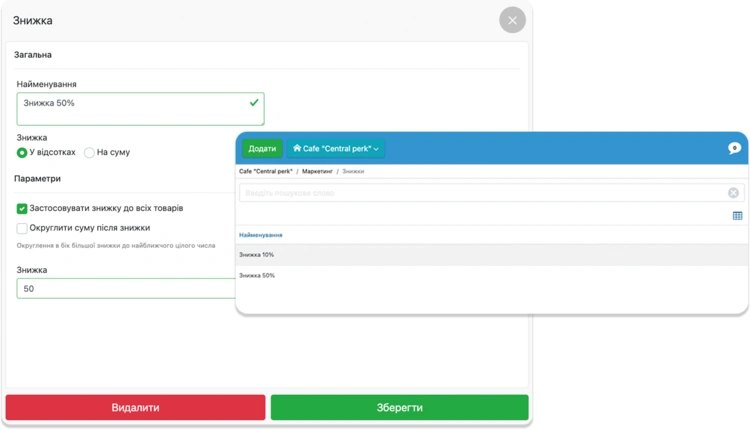
Bonuses, accruals, discounts, discount cards and a builder for promotions on individual products and services.
Campaigns via SMS, Viber, email
Marketing campaigns and personalized offers to customers straight from Skyservice.
Auto-triggers and certificates
Automatic visit reminders, birthday greetings, customer reactivation and gift certificates.
Skyservice CRM from the inside
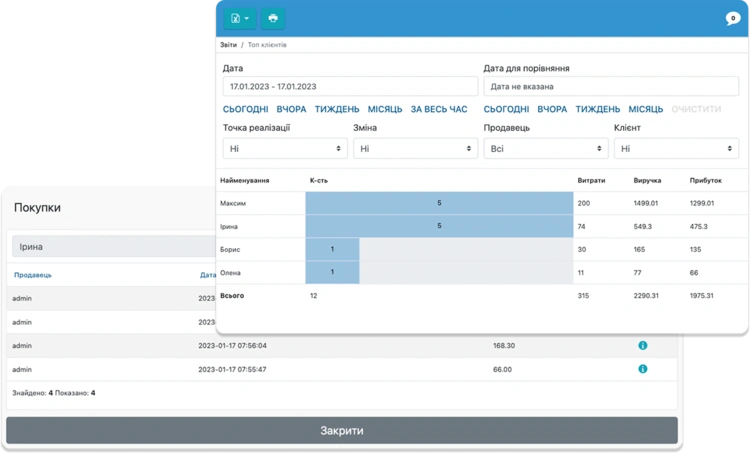
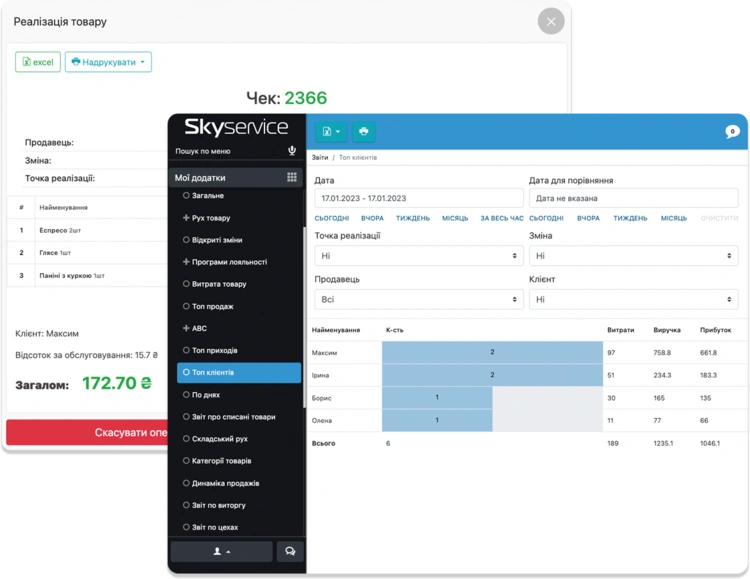
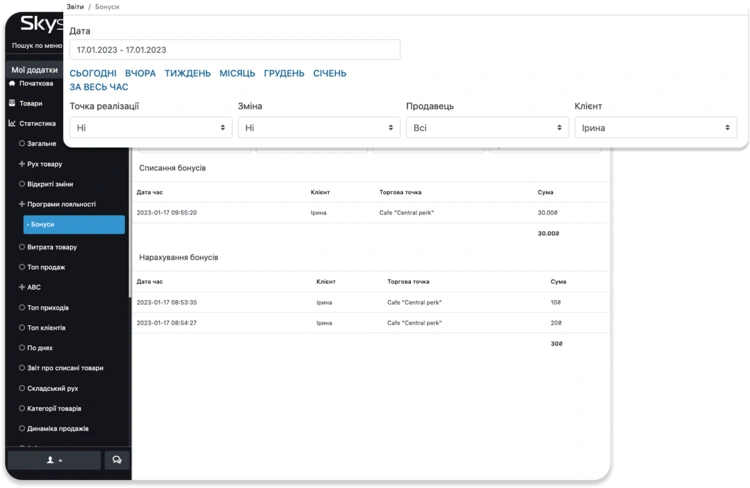
A few screens of the real interface — how working with customers, loyalty and analytics looks in Skyservice POS:
What CRM in Skyservice POS gives you
- Keep a single customer database with purchase history right in the register — with no separate service
- Bring customers back with a loyalty program, bonuses and personalized offers
- Split customers into segments and make offers more precise
- Send campaigns via SMS, Viber and email and automatic reminders
- See your top customers and sales and loyalty statistics in one place
Frequently asked questions about Skyservice CRM
What is CRM in the Skyservice POS register?
It's a built-in customer database with a card for every buyer: purchase and visit history, bonuses, balance and segments. The CRM works together with the register, so every payment automatically lands in the customer's profile — no separate service is needed.
Is the CRM suitable for a restaurant or cafe?
Yes. CRM for restaurants and cafes keeps a database of guests with their order history, awards bonuses, lets you make personalized offers and bring visitors back through campaigns and reminders.
Is there CRM for delivery?
Yes. For delivery, the CRM stores customers with their orders and preferences and helps bring back those who haven't ordered in a while through campaigns via SMS or Viber and personalized discounts.
Can I run CRM for a beauty salon?
Yes. CRM for beauty salons is a customer card with a history of visits and services, reminders about the next treatment, a loyalty program and bonuses for regular customers.
Can I send campaigns to customers?
Yes. With Skyservice you send marketing campaigns and personalized offers via SMS, Viber or email, and you also set up automatic reminders — about a visit, a birthday or bringing a customer back.
Can I import an existing customer database?
Yes. You can create customers manually or import an existing database, after which every new purchase automatically adds to the customer's card.
How much does CRM in Skyservice POS cost?
CRM is part of the Skyservice POS register's functionality — there's no need to buy a separate system. Register plans start at 387 UAH/month, and you can try the whole system together with CRM free for 14 days.
Is the CRM suitable for a bakery or a store?
Yes. For a bakery, confectionery or store, the CRM keeps a buyer database with discount and bonus cards, accumulative discounts and promotions, and segmentation helps make personalized offers to regular customers.
Why is CRM in the register better than a separate CRM system?
CRM in Skyservice POS is already built into the register, so every purchase automatically lands in the customer's card — there's no need to integrate a separate service, pay for it separately and reconcile data by hand. Sales, the customer database, loyalty and analytics all live in one system.
Can I set up segments and automatic reminders?
Yes. You split customers into segments by purchase amount, frequency or category and set up automatic triggers — visit reminders, birthday greetings and win-back of customers who haven't visited in a while.
Skyservice POS — a CRM system for customer management
If you're looking for CRM for restaurants, cafes, delivery, beauty salons or bakeries, Skyservice POS covers it with a built-in CRM right in the register. Keep a single customer database with purchase and visit history, split it into segments, launch a loyalty program with bonuses and discounts, send campaigns via SMS, Viber and email, and turn on automatic reminders. All customer work and all revenue — in one system. Try Skyservice POS free for 14 days.
TRY SKYSERVICE POS FOR FREE
Just sign up and get started. The first 14 days are free.
Try for freeOther Skyservice POS features


Need help launching CRM for your business?
Our support team will help you set up a customer database, configure the loyalty program, segments and campaigns for your restaurant, cafe, delivery service or beauty salon. Message the Skyservice technical support chat or give us a call — consultations are free.