Fiscalization and Programmatic PPO
Skyservice POS provides the opportunity|
What is a software PPO? This is a software registrar of settlement operations. Each entrepreneur chooses for himself what to use: PPO or PRPO. Skyservice POS software has its own software PPO. Using our program, you do not pay additional fees for this function. The system generates Z-reports, prints fiscal checks and transfers data to the Tax Service of Ukraine.
Need a cash register app on your phone or tablet? Skyservice software cash register
Electronic check. Fiscalization
Generate electronic receipts in Skyservice POS

Our program creates electronic receipts for each fiscal sale made. All data is securely stored in the system and records exactly how the sale was made: fiscal or not.
Z-report for the State Tax Service
Print a fiscal Z-report at the end of each shift
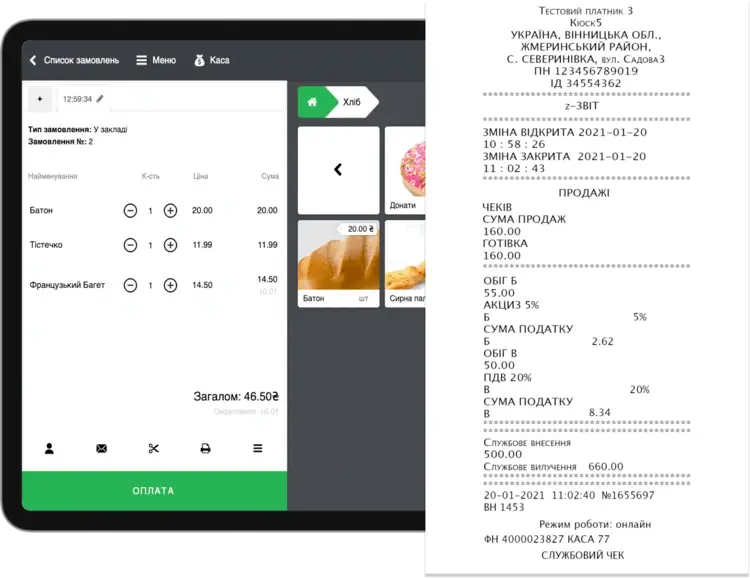
A report with cancellation, i.e. a Z-report, must be generated at the end of each work shift. It contains all the data on the transactions carried out during the day.
Knowledge base
Useful lessons for a quick start in the Skyservice POS program

For your convenience, we have developed a lesson in the Knowledge Base that describes in detail what a PRRO is, how to register, and how to work in it.

For your convenience, we have compiled a useful list of taxes for all sole proprietors in one place.

Fill out and register the Settlement Transactions Book and the Settlement Book.
UKTZED. Working with software RRO
Enter the UKTZED code for each individual product
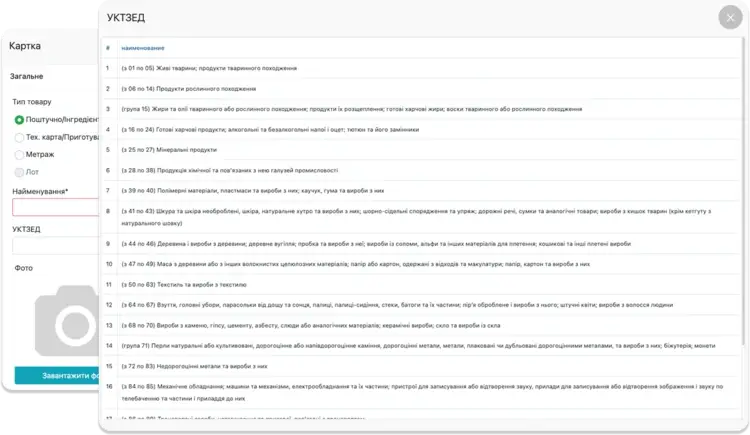
If your store or establishment sells excisable goods, by law you must use UKTZED codes. Enter the UKTZED code when filling out the card for each product.
Fiscal registrars with which the Skyservice POS program works
Fiscalization of PRRO/RRO
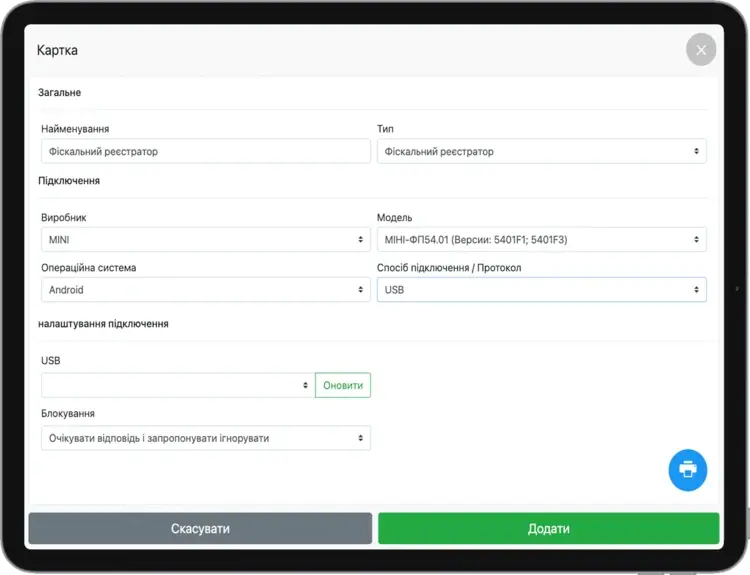
The fiscal registrar is used to print checks, record transactions for the day, and transmit data to the State Tax Service. The Skyservice POS cloud cash register works with a large number of fiscal registrars. Check out the full list of equipment.
Software cash register (PRRO): what is it?
A software cash register (PRRO) is the equivalent of a classic cash register (RRO): instead of a physical cash machine, you use an app that records every fiscal payment in the same way and sends the data to the State Tax Service of Ukraine. A PRRO runs on any modern device, and sole proprietors can choose what to use at their points of sale. If you use a software cash register, you don't need to keep a Book of Settlement Transactions.
Every sole proprietor of groups 2–4 must use an RRO or a PRRO. If an entrepreneur uses neither, the law provides for substantial fines. That's why we recommend following the law and setting up an RRO or a software cash register at your points of sale in good time.
To register a PRRO, you need to complete a few steps:
- Get a key and a certificate;
- Log in to the taxpayer's account and register your point of sale;
- Register the PRRO;
- Register the cashier;
- Receive the certificate;
- Set up taxes and go to the PRRO settings in Skyservice.
In the POS terminal, open Menu → Devices. Add a new device and fill in all the fields. Then add the PRRO key to the employee in the device settings. Upload the certificate and the key, enter the password and save.
Electronic receipts and fiscalization
To print receipts, every sole proprietor needs to connect a thermal printer. Every entrepreneur must organize their work so that customers receive fiscal receipts, either printed or electronic. All these receipts are recorded on the State Tax Service servers, where each one gets a fiscal number that can later be used to verify the purchase.
Z-reports: a software cash register for sole proprietors
At the end of each shift, the system generates a Z-report with all fiscal sales made that day, and the data is sent to the State Tax Service. Every entrepreneur must keep Z-reports for 3 years (1,095 days) and choose the storage format: printed or electronic.
At our users' request, we added the ability to print Z-reports for past shifts. In the admin panel, go to Statistics → Shifts, select a shift, click "PRRO data" and print the report on a thermal printer or as an A4 document.
What does our software offer?
Skyservice POS, the business automation software, lets every user work with a software cash register for free. Use a reliable, high-quality app with a wide range of features at an affordable price.
Other Skyservice POS features


Need more help? Call us back, 24/7 technical support