Tableside Ordering with the Skyservice POS Mobile Waiter
The waiter takes orders right at the table on a phone or tablet — the dish flies straight to the kitchen and statuses are visible in real time. No running back and forth to a fixed till.
What is the mobile waiter in Skyservice POS?
The mobile waiter is a Skyservice POS mode on a smartphone or tablet where the waiter takes orders right at the guest's table instead of running back to a fixed till. Staff open the app, pick a table, add dishes from the menu — and the order is instantly sent to the kitchen and the point-of-sale system. This is especially valuable in restaurants where service speed directly drives turnover and the number of guests per shift.
How does the mobile waiter work?
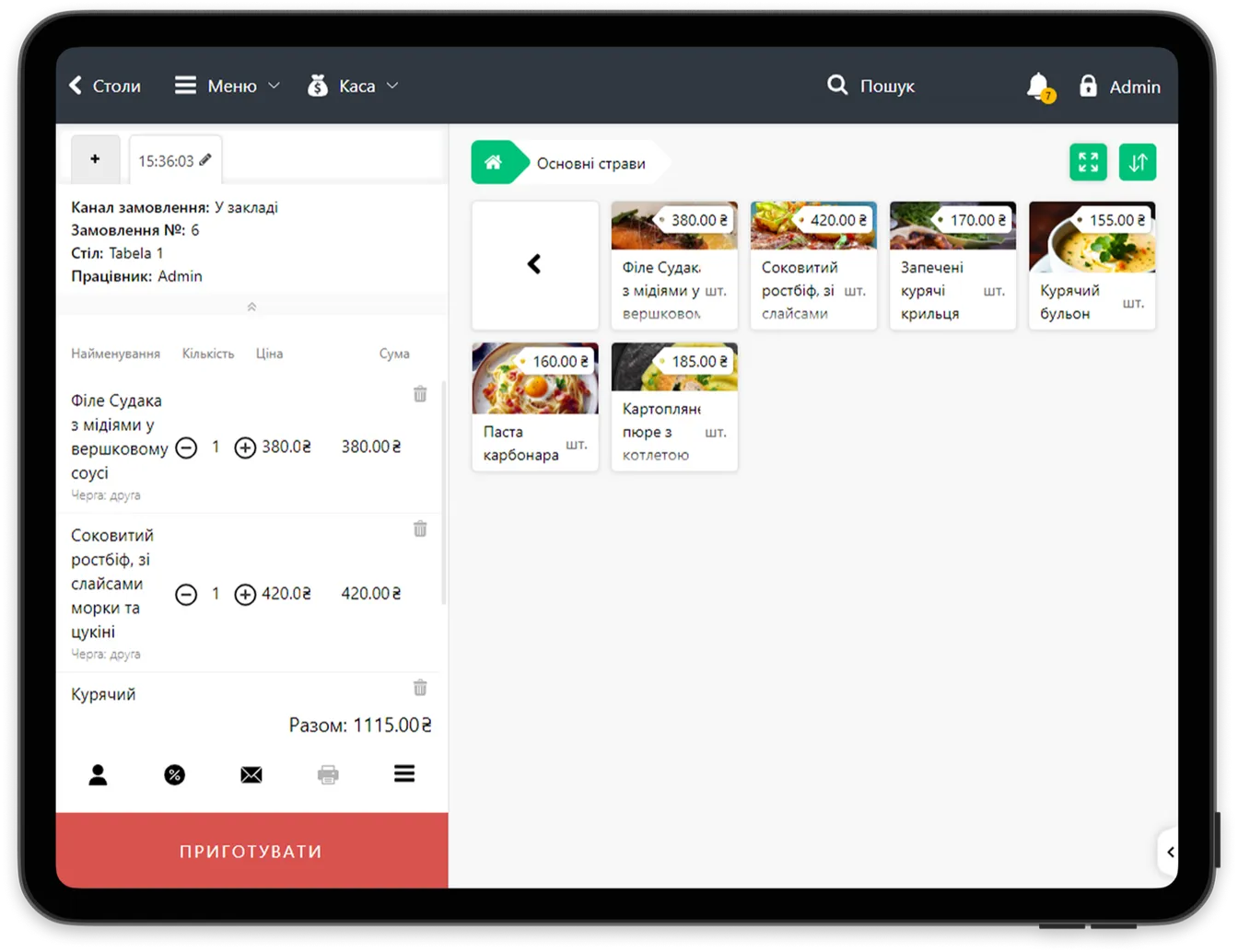
The waiter opens Skyservice POS on their device, selects a table on the floor plan and builds the order right beside the guest: adding dishes, specifying modifiers (no onion, well done) and splitting items between guests. Once confirmed, the order goes straight to the kitchen screen — the cook starts preparing it without waiting for a paper ticket to be carried over.
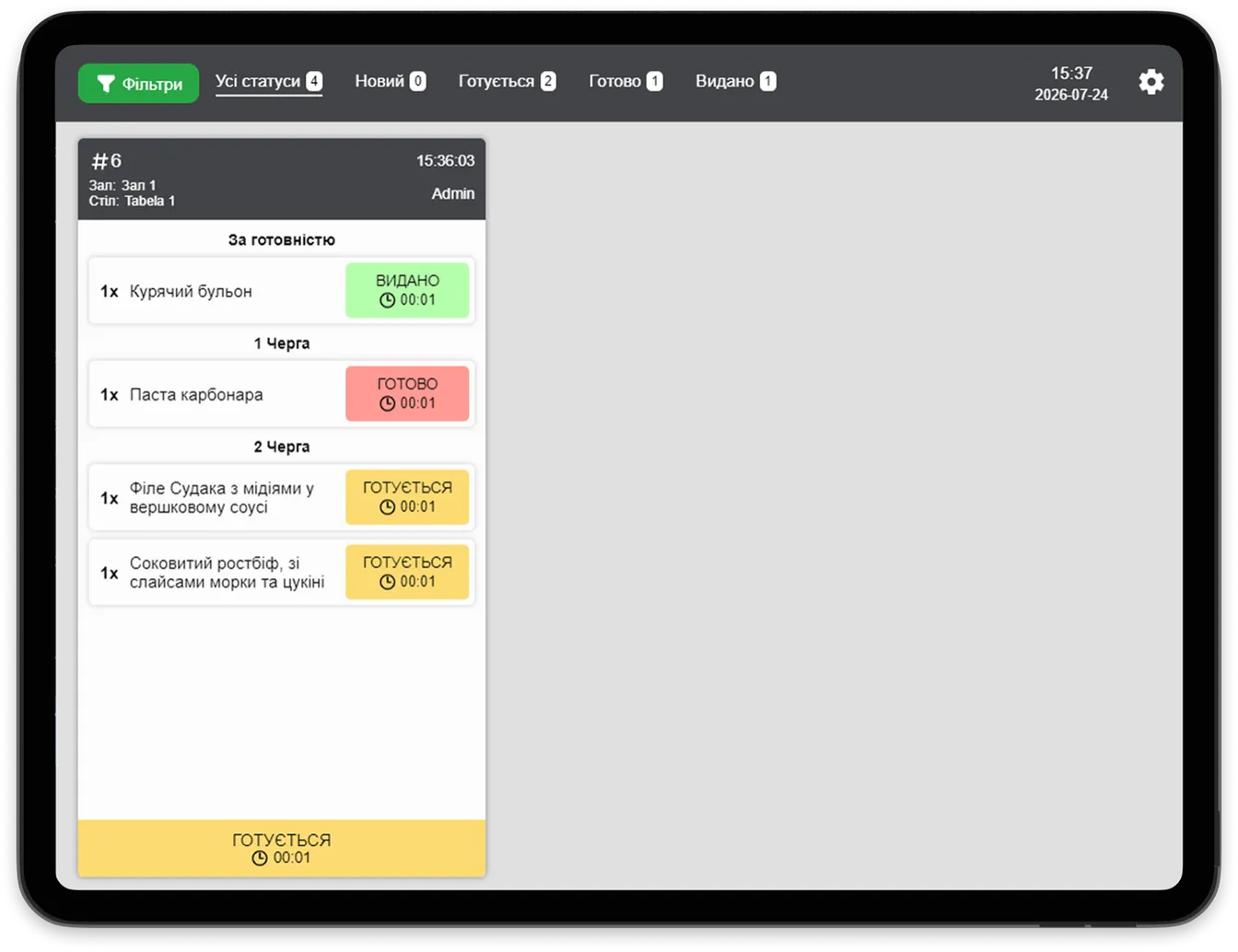
The waiter sees the status of every dish in real time: "Cooking", "Ready", "Served". When a dish is ready, a notification arrives on the phone that it can be picked up. There is no need to walk to the kitchen to check. Payment can also be settled at the table — with a fiscal receipt through the Skyservice PRRO (fiscal receipt).
Scenario: a large terrace during the rush
A 30-table summer terrace, a Saturday night, every seat taken. It used to be that the waiter took the order on a notepad, ran to the till at the far end of the hall, rang it up, carried the ticket to the kitchen — and round again. Now the waiter takes the order right at the table on a smartphone: adding dishes, specifying modifiers, splitting items between guests. The order flies straight to the kitchen screen and the cook starts preparing it immediately. While one party is choosing dessert, the waiter is already taking an order at the next table. Over a shift they serve noticeably more guests — with no wasted steps and no lost tickets.
Runs on any device
Skyservice POS is a cloud solution, so the mobile waiter runs on smartphones and tablets with iOS, iPadOS, Android and Huawei. No special, expensive hardware is required — an ordinary waiter's phone will do. Data syncs across every device instantly: an order from the waiter's phone is immediately visible on the fixed till, the kitchen screen and the owner's admin panel.
Faster service — greater turnover
Every minute a waiter saves means more tables served per shift. When staff aren't spending time walking to the till and back, and dishes reach the kitchen instantly, table turnover rises, the kitchen queue evens out and guests get their orders faster. For the venue that has a direct impact on revenue: the same hall and the same team serve more guests with no drop in quality.
Who the mobile waiter is for
The mobile waiter suits venues with table service: restaurants, cafes, gastropubs, bars, summer terraces and banquet halls. It is especially useful where there is a large hall or several floors — the waiter does not waste time walking to the till and back, and serves more tables per shift.
How to get started with the mobile waiter
- 1Install the app. Download Skyservice POS onto the waiter's smartphone or tablet — iOS, iPadOS, Android or Huawei. No special hardware required.
- 2Sign in with your account. Each waiter signs in with their own PIN, so every order and tip is tied to a specific employee.
- 3Take orders at the table. Pick a table on the floor plan, add dishes from the menu, specify modifiers — and the order flies straight to the kitchen with no trip to the till.
Notepad and till vs the mobile waiter
| What we compare | Notepad + fixed till | Skyservice mobile waiter |
|---|---|---|
| Sending to the kitchen | A paper ticket carried by hand | Instantly to the kitchen screen |
| Waiter's steps | Table — till — kitchen — table | All right at the guest's table |
| Order errors | Illegible handwriting, lost tickets | A precise electronic record |
| Dish status | You have to go and ask the kitchen | Visible on the phone + a ready notification |
| Hardware | A fixed terminal | The waiter's ordinary smartphone |
What the mobile waiter in Skyservice POS gives you
Skyservice POS with the mobile waiter lets you:
- Take orders right at the table — no running back to a fixed till
- Send dishes to the kitchen screen instantly, without paper tickets
- See the status of every dish in real time and get ready notifications
- Work on an ordinary smartphone or tablet — no expensive hardware
- Serve more tables per shift and increase the venue's turnover
Frequently asked questions about the mobile waiter
Does the mobile waiter need special hardware?
No. Skyservice POS runs on ordinary smartphones and tablets with iOS, iPadOS, Android and Huawei. A waiter's personal phone is enough — there is no need to buy expensive specialised terminals.
How does the order reach the kitchen?
Once confirmed on the waiter's device, the order instantly appears on the kitchen screen (Kitchen Screen). The cook sees the dish right away and starts cooking — with no paper tickets and no risk of losing a slip.
Can payment be settled right at the table?
Yes. Skyservice POS lets you close the bill and issue a fiscal receipt through the built-in PRRO (fiscal receipt) right at the guest's table — with mobile acquiring, payment can be taken on the spot too.
Can the bill be split between guests from the phone?
Yes. The waiter can split order items between guests right in the app — each pays for their own. This is handy for groups and reduces confusion at payment time.
Are orders tied to a specific waiter?
Yes. Each waiter works under their own PIN, so the system knows who took the order and served the table. This is the basis for tracking output and tips per employee.
What happens if the internet goes down?
Skyservice POS is cloud-based, so a connection is needed to sync. We recommend a stable Wi-Fi network in the hall — once the connection is restored, data syncs across devices automatically.
Does the kitchen see dish modifiers?
Yes. All modifiers (no onion, level of doneness, sauce on the side) are sent to the kitchen screen along with the dish, so the cook prepares it exactly as the guest asked.
Skyservice POS — a waiter app for phone and tablet
If you are looking for a mobile waiter app or a tableside ordering app for taking orders at the table, Skyservice POS covers it in the core feature set. The waiter takes orders on a smartphone or tablet, the dish flies straight to the kitchen and statuses are visible in real time. This waiter POS app runs on iOS, Android and Huawei with no expensive hardware. Try Skyservice POS free for 14 days.
TRY SKYSERVICE POS FOR FREE
Just sign up and get started. The first 14 days are free.
Try for freeOther Skyservice POS features


Need help with the mobile waiter?
Our support team will help you set up waiter workflows on smartphones and tablets. Message the Skyservice technical support chat or give us a call — consultations are free.