Manage Table Bookings in Skyservice POS
A visual floor plan, real-time table statuses, a guest database and reminders — table booking runs inside the Skyservice POS checkout module, with no third-party services.

What is table booking in Skyservice POS?
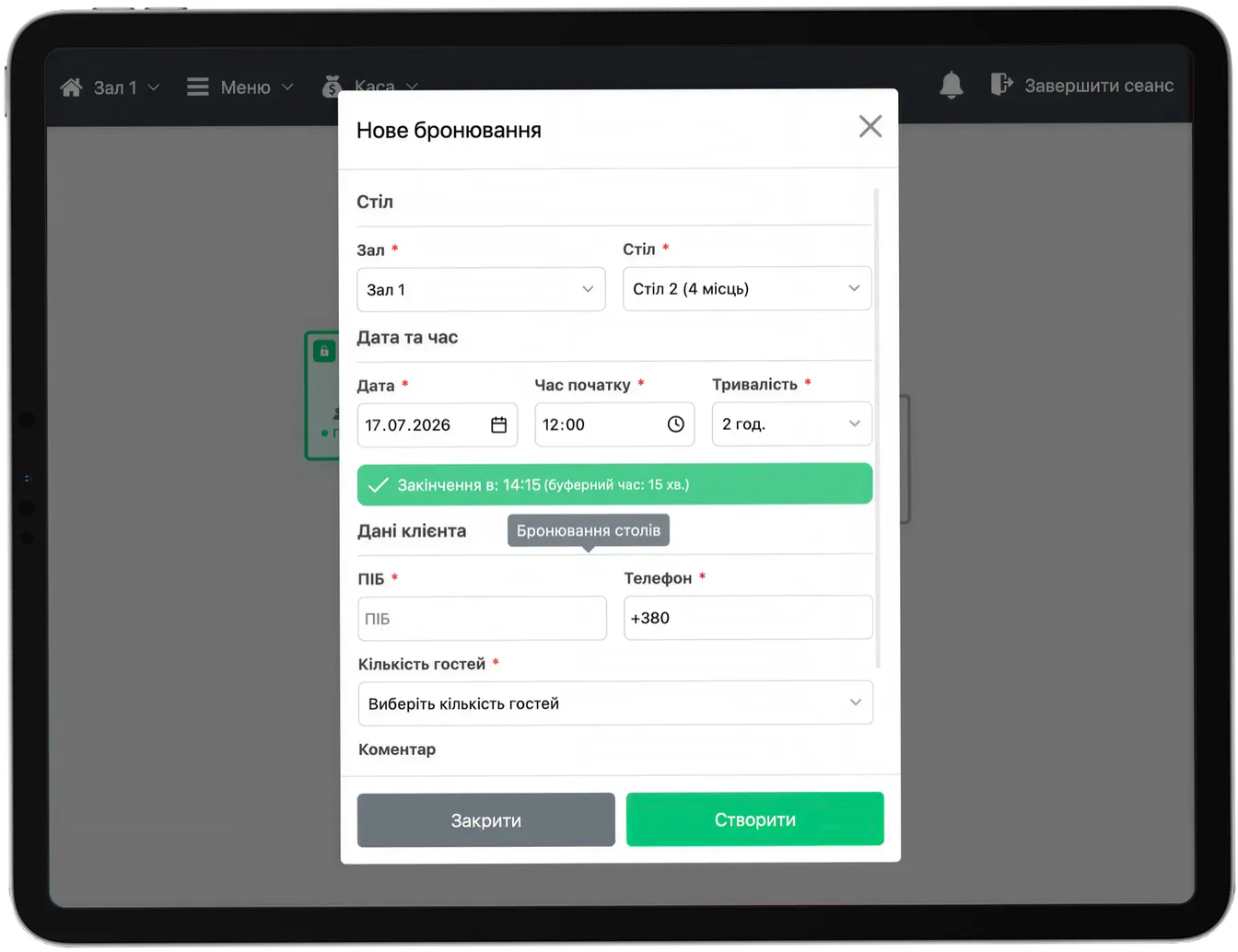
Table booking is a Skyservice POS module for restaurants, cafes and bars that lets you take and manage reservations directly in the point-of-sale system. The host sees an interactive floor plan with every table, picks a free one, enters the guest details (name, phone, time, party size) — and the reservation is pinned to that specific table. No separate apps, notebooks or outside booking services are needed: everything runs within Skyservice, alongside orders, receipts and the customer database.
How does table booking work?
The host opens the floor plan, selects a free table for the required time and creates a reservation: guest name, phone, party size, arrival time and a note (a high chair or a celebration, for example). The table is automatically marked as reserved — waiters and hosts see it in real time across every device.
When the guest arrives, the reservation converts into an open bill for that table. The full visit history is stored in the customer database: how often the guest has come, their average check, their favourite dishes. That is the foundation for personalised offers and a loyalty programme.
Scenario: a Friday night with a full house
6 p.m. on a Friday — the phone rings off the hook as guests try to book a table for the evening. The host opens the floor plan in Skyservice POS and sees it all at once: which tables are free at 8 p.m., which are already taken and which are reserved. A booking for six by the window — a few taps, and the guest's name and phone are entered in seconds. The table is highlighted as reserved on every device: waiters won't seat walk-ins there, and two hosts won't book the same table twice. When the party arrives, the reservation turns into an open bill with a single tap, and the order is already on its way to the kitchen. No crossings-out in a notebook and no muddle over tables.
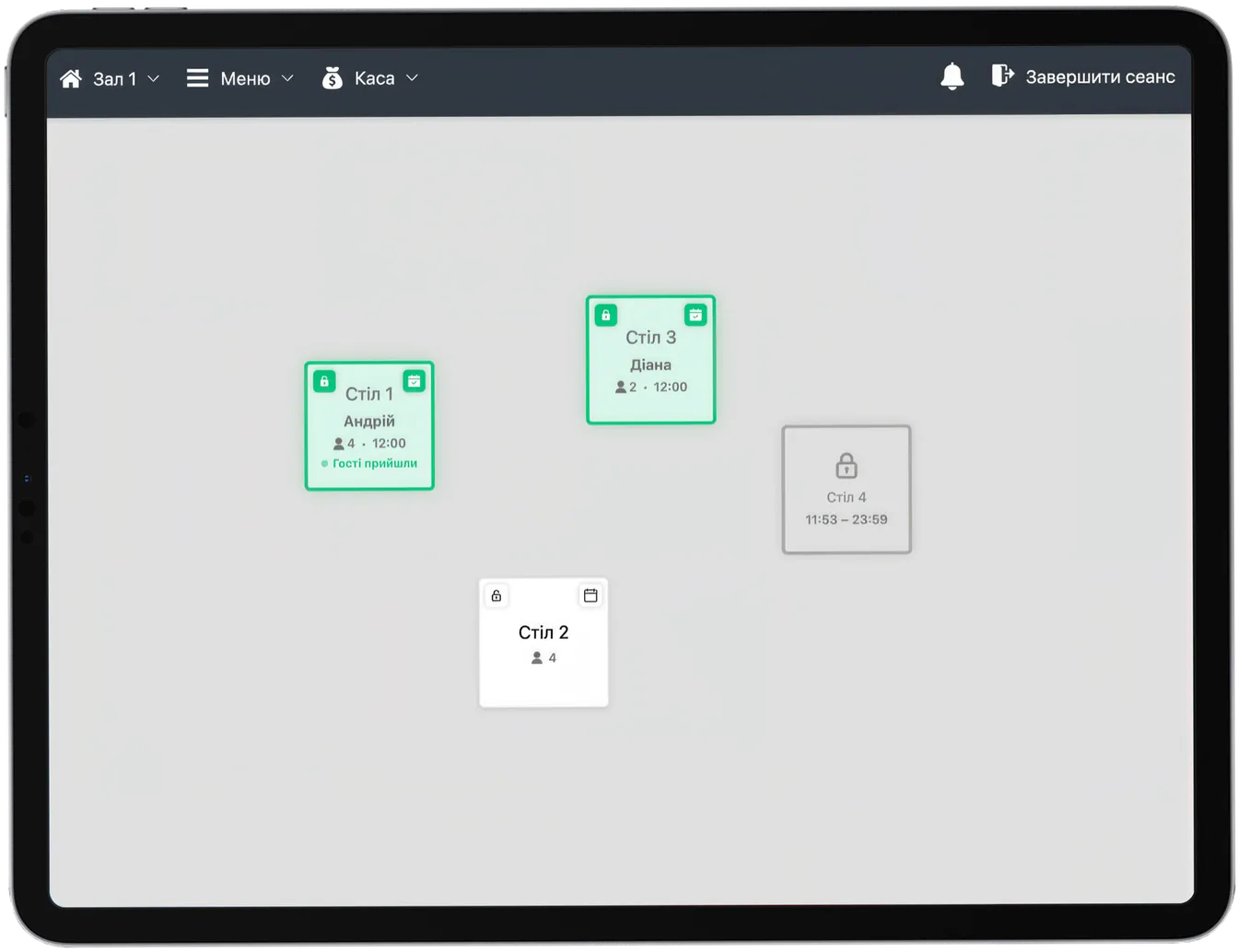
Visual floor plan
Skyservice POS lets you tailor the floor plan to your venue: arrange tables across rooms, floors, terraces or VIP areas and set the number of seats at each. Colour-coded statuses show the situation at a glance: free, occupied, reserved. This speeds up seating during peak hours and rules out the case where two waiters work the same table.
Bookings, the guest database and loyalty in one place
Because booking works inside Skyservice POS, every visit is automatically tied to the guest's card. You can see how often a guest comes in, their average check and their favourite dishes. That is what powers the loyalty programme: bonuses, personalised discounts and offers for regulars. A reservation stops being just a note about a table — it becomes part of the customer relationship history and a tool for repeat sales.
Who table booking is for
The reservation module suits venues where guests plan visits in advance: restaurants, coffee shops, bars, gastropubs, banquet halls, karaoke venues and places that host special events. It is especially useful on weekends and holidays, when booking volume is high and keeping track by hand in a notebook leads to clashes and double reservations.
How to launch table booking in 3 steps
- 1Set up your floor plan. Arrange tables across rooms, floors and terraces, and set the number of seats at each. You do this once in the Skyservice POS settings.
- 2Take bookings. The host picks a free table for the required time and enters the guest details — name, phone, party size and a note. The table is marked as reserved right away.
- 3Welcome your guest. When the guest arrives, the reservation turns into an open bill for that table with a single tap — the waiter takes the order straight away, and the visit history is saved in the customer database.
A booking notebook vs Skyservice POS
| What we compare | Notebook / manual tracking | Skyservice POS |
|---|---|---|
| Viewing free tables | Flipping through notebook pages | A visual floor plan in real time |
| Double bookings | Common due to human error | Ruled out — the table is blocked instantly |
| Access from multiple devices | A single paper notebook | In sync across every till and phone |
| Guest database | None, or kept separately | Visit history, average check, preferences |
| Turning a booking into a bill | Rewrite the order by hand | A single tap, and the order goes to the kitchen |
What table booking in Skyservice POS gives you
Skyservice POS with the reservation module lets you:
- Keep every reservation in one system — no notebooks or third-party services
- See a visual floor plan with live table statuses in real time
- Avoid double bookings and clashes during peak hours
- Build a guest database — visit history, average check, preferences
- Turn a reservation into an open bill with a single tap when the guest arrives
Frequently asked questions about table booking
Do I need a separate app for table booking?
No. Table booking is built into Skyservice POS and works together with the checkout, the floor plan and the customer database. There is no need to buy or integrate third-party services — everything is in one system.
Can the floor plan be customised for my venue?
Yes. You arrange tables across rooms, floors, terraces or VIP areas and set the number of seats. Colour-coded statuses (free, occupied, reserved) help the host stay oriented at a glance.
How much does table booking in Skyservice cost?
The feature is available in Skyservice POS. You can try the system free for 14 days with no bank card and test the reservation module on real bookings for your venue.
What happens to a reservation if the guest doesn't show up?
The host can cancel or reschedule the reservation in a few taps — the table is freed up immediately and becomes available to other guests. Cancellation history is stored, so you can see which guests frequently fail to show.
Can waiters see reservations on their own devices?
Yes. Because Skyservice POS is cloud-based, table statuses sync across every device instantly. Waiters and hosts see reserved tables in real time on the till, tablet or phone.
Is booking suitable for banquets and large parties?
Yes. You can reserve several tables or an entire zone for an event, add a note (decor, a set menu, the number of guests) and manage the banquet order in the same system. This is handy for restaurants and banquet halls.
Does the system keep a guest's visit history?
Yes. Every reservation is tied to the guest's card in the customer database: how many times they have visited, their average check, their favourite dishes. This history is the basis for personalised offers and a loyalty programme.
Skyservice POS — a restaurant table reservation system
If you are looking for a restaurant table reservation system or table booking POS for a cafe, Skyservice POS covers it without any third-party services. The reservation module works alongside the checkout, the floor plan, the customer database and the loyalty programme. The host manages bookings visually, guests never run into double reservations, and visit history builds up automatically. Try Skyservice POS free for 14 days.
TRY SKYSERVICE POS FOR FREE
Just sign up and get started. The first 14 days are free.
Try for freeOther Skyservice POS features


Need help setting up your reservations?
Our support team will help you configure the floor plan and table booking for your venue. Message the Skyservice technical support chat or give us a call — consultations are free.